Info
Descargar
Topologia
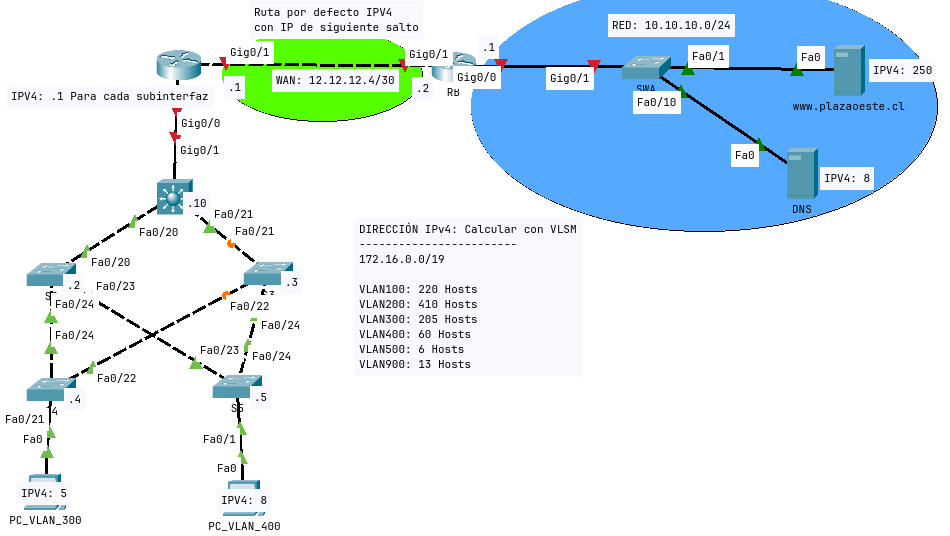
Contenido
Objetivos: Aplicar elementos practicos estudiados en la primera experiencia de la asignatura.
Esta actividad de caracter Sumativa. En la ejecucion de esta actividad deberas poner en practica los conceptos teoricos y practicos vistos durante la Experiencia 1
Instrucciones iniciales:
- La actividad se desarrollara de manera individual.
- Debe leer las instrucciones antes de comenzar.
- Configure topologia en Packet Tracer segun las indicaciones.
- Enviar el ejercicio resuelto segun indicaciones de su docente.
Indicaciones para configurar la topologia
- Asignacion de IP
- Configuracion Basica De Equipos
- Realizar configuracion basica de routers y switch considerando los siguientes datos:
- Hostname segun topologia
- Clave acceso remoto telnet: “oeste”
- Clave consola: “ccna”
- Mensaje de bienvenida “Solo permitido ingreso de personal autorizado”
- Realizar configuracion basica de routers y switch considerando los siguientes datos:
- Implementacion De Tecnologias De Capa 2
- Crear las VLAN en todos los switches, segun ID y nombres solicitados.
- En los switches de acceso, asignar rango de interfaces a VLANs correspondientes, las puertas sobrantes deberan ser asignadas a VLAN900 y quedar apagadas.
- Permitir en enlaces troncales el paso de todas las VLANS, excepto la de “CONTROL”.
- En los enlaces troncales deshabilitar protocolo DTP.
- En los enlaces troncales, permitir paso de VLAN Nativa.
- En todos los switches implementar PVST (802.1D (STP)).
- Realizar las configuraciones necesarias para que la VLAN 100, 200 y 300 sean root primary para S2, y la VLAN 400, 500 y 900 sean root primary para S3. | STP Root Primary
- En interfaces de acceso, implementar Mecanismos de estabilizacion de STP (portfast y BPDU).
Tabla VLSM
RED: 172.16.0.0/19
| Nombre | VLAN ID | Host | Address | CIDR Mask | Dec MASK |
|---|---|---|---|---|---|
| CAMARAS | 200 | 410 | 172.16.0.0 | /23 | 255.255.254.0 |
| TI | 100 | 220 | 172.16.2.0 | /24 | 255.255.255.0 |
| IOT | 300 | 205 | 172.16.3.0 | /24 | 255.255.255.0 |
| SOPORTE | 400 | 60 | 172.16.4.0 | /26 | 255.255.255.192 |
| NATIVA | 900 | 13 | 172.16.4.64 | /28 | 255.255.255.240 |
| CONTOL | 500 | 6 | 172.16.4.80 | /29 | 255.255.255.248 |
- Implementacion De Tecnologias De Capa 3
- Asignar IPv4 a los switches a traves de la VLAN Administrativa.
- Todos los switches deberan tener configurado default-gateway.
- Realizar Enrutamiento Inter-Vlan en RA. Debera utilizar la IP .1 en IPv4, para cada una de las VLANs correspondiente.
- En los equipos RA y RB, debera implementar enrutamiento estatico por defecto en IPv4 con next-hop.
- Servicios
- Verifique que servicio WEB se encuentre activo en
www.plazaoeste.cl - Configure DNS para permitir a usuarios acceder a
www.plazaoeste.cl
- Verifique que servicio WEB se encuentre activo en
- Verificacion
- Realizar pruebas de conectividad por ping entre equipos terminales
- Verifique la operacion para los servicios solicitados (WEB-DNS)
Configuracion
Dispositivos Finales
PC_VLAN_300
- IPv4: 172.16.3.5
- Mascara: 255.255.255.0
- Default Gateway: 172.16.3.1
- DNS: 10.10.10.8
PC_VLAN_400
- IPv4: 172.16.4.8
- Mascara: 255.255.255.192
- Default Gateway: 172.16.4.1
- DNS: 10.10.10.8
DNS SERVER
- IPv4: 10.10.10.8
- Mascara: 255.255.255.0
- Default Gateway: 10.10.10.1
- DNS: 10.10.10.8
DHCP
- IPv4: 10.10.10.250
- Mascara: 255.255.255.0
- Default Gateway: 10.10.10.1
- DNS: 10.10.10.8
RB
hostname RB
!
line console 0
pass ccna
exit
!
line vty 0 4
pass oeste
exit
!
banne motd "#Solo ingreso de personal autorizado#"
!
int g0/0
ip add 10.10.10.1 255.255.255.0
no shut
exit
!
int g0/1
ip add 12.12.12.6 255.255.255.252
no shut
exit
!
ip route 0.0.0.0 0.0.0.0 12.12.12.5
RA
hostname RA
!
line console 0
pass ccna
exit
!
line vty 0 4
pass oeste
exit
!
banne motd #Solo ingreso de personal autorizado#
!
int g0/1
ip add 12.12.12.5 255.255.255.252
no shut
exit
!
ip route 0.0.0.0 0.0.0.0 12.12.12.6
!
int g0/0
no shut
exit
!
int g0/0.100
encapsulation dot 100
ip address 172.16.2.1 255.255.255.0
no shut
exit
!
int g0/0.200
encapsulation dot 200
ip address 172.16.0.1 255.255.254.0
no shut
exit
!
int g0/0.300
encapsulation dot 300
ip address 172.16.3.1 255.255.255.0
no shut
exit
!
int g0/0.400
encapsulation dot 400
ip address 172.16.4.1 255.255.255.192
no shut
exit
!
int g0/0.500
encapsulation dot 500
ip address 172.16.4.81 255.255.255.248
no shut
exit
!
int g0/0.900
encapsulation dot 900
ip address 172.16.4.65 255.255.255.240
no shut
exit
!
S5
hostname S5
vlan 100
name TI
exit
!
vlan 200
name CAMARAS
exit
!
vlan 300
name IOT
exit
!
vlan 400
name SOPORTE
exit
!
vlan 500
name CONTROL
exit
!
vlan 900
name NATIVA
exit
!
int fa0/1
Switchport mode access
switchport access vlan 400
spanning-tree portfast
spanning-tree bpduguard enable
no shut
exit
!
int range fa0/2-22
Switchport mode access
switchport access vlan 900
shut
exit
!
int range fa0/23-24
switchport mode trunk
switchport trunk allowed vlan 100,200,300,400
switchport trunk native vlan 900
switchport nonegotiate
no shut
exit
!
int vlan 900
ip add 172.16.4.69 255.255.255.240
exit
!
spanning-tree mode pvst
ip default-gateway 172.16.4.65
S4
hostname S4
vlan 100
name TI
exit
!
vlan 200
name CAMARAS
exit
!
vlan 300
name IOT
exit
!
vlan 400
name SOPORTE
exit
!
vlan 500
name CONTROL
exit
!
vlan 900
name NATIVA
exit
!
int fa0/21
Switchport mode access
switchport access vlan 300
spanning-tree portfast
spanning-tree bpduguard enable
no shut
exit
!
int range fa0/1-20,fa0/23
Switchport mode access
switchport access vlan 900
shut
exit
!
int range fa0/22,fa0/24
switchport mode trunk
switchport trunk allowed vlan 100,200,300,400
switchport trunk native vlan 900
switchport nonegotiate
no shut
exit
!
int vlan 900
ip add 172.16.4.68 255.255.255.240
exit
!
spanning-tree mode pvst
!
ip default-gateway 172.16.4.65
S3
hostname S3
vlan 100
name TI
exit
!
vlan 200
name CAMARAS
exit
!
vlan 300
name IOT
exit
!
vlan 400
name SOPORTE
exit
!
vlan 500
name CONTROL
exit
!
vlan 900
name NATIVA
exit
!
int range fa0/1-20,fa0/23
Switchport mode access
switchport access vlan 900
no shut
exit
!
int range fa0/21,fa0/22,fa0/24
switchport mode trunk
switchport trunk allowed vlan 100,200,300,400
switchport trunk native vlan 900
switchport nonegotiate
no shut
exit
!
int vlan 900
ip add 172.16.4.67 255.255.255.240
exit
!
spanning-tree mode pvst
!
spanning-tree Vlan 400,500,900 root Primary
!
ip default-gateway 172.16.4.65
S2
enable
config t
hostname S2
vlan 100
name TI
exit
!
vlan 200
name CAMARAS
exit
!
vlan 300
name IOT
exit
!
vlan 400
name SOPORTE
exit
!
vlan 500
name CONTROL
exit
!
vlan 900
name NATIVA
exit
!
int range fa0/1-19,fa0/21-22
Switchport mode access
switchport access vlan 900
no shut
exit
!
int range fa0/20,fa0/23,fa0/24
switchport mode trunk
switchport trunk allowed vlan 100,200,300,400
switchport trunk native vlan 900
switchport nonegotiate
no shut
exit
!
int vlan 900
ip add 172.16.4.66 255.255.255.240
exit
!
spanning-tree mode pvst
!
spanning-tree Vlan 100,200,300 root Primary
!
ip default-gateway 172.16.4.65
!
S1
enable
config t
hostname S1
vlan 100
name TI
exit
!
vlan 200
name CAMARAS
exit
!
vlan 300
name IOT
exit
!
vlan 400
name SOPORTE
exit
!
vlan 500
name CONTROL
exit
!
vlan 900
name NATIVA
exit
!
int range fa0/1-19,fa0/22-24
Switchport mode access
switchport access vlan 900
no shut
exit
!
int range fa0/20,fa0/21
switchport trunk encapsulation dot1q
switchport mode trunk
switchport trunk allowed vlan 100,200,300,400
switchport trunk native vlan 900
switchport nonegotiate
no shut
exit
!
int vlan 900
ip add 172.16.4.74 255.255.255.240
exit
!
spanning-tree mode pvst
!
ip default-gateway 172.16.4.65
!
SWA
hostname SWA
int g0/1
no shut
exit
!